Monday, May 19

Game of the week: TypeRacer

A flashy flash typing game that lets you compete with other online players.

http://play.typeracer.com/

Thanks DownloadSquad.com for the pointer.

Labels: ,

Tuesday, October 30

ImageStation download software walkthrough

If you have been reading my blog, you should know that Sony's ImageStation web site is closing on Feb 1, 2008. That means the photos and videos hosted by the web site will no longer be available for viewing or download from then on. ImageStation offers a few options for its members to keep their photos available. One of such options is a software that runs on the user's computer to download the originals of all the photos from his/her online albums. I dedicate this post to walkthrough the software.

Software download
Once you sign in the ImageStation web site, you can find a red banner at the top of the page. The link on the banner takes you to the available options for keeping your photos. In particular, you will find the following section:
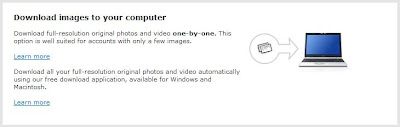

Click on the "Learn more" link regarding download of full-resolution original photos. You will be sent to a page that lets you download the photo download software according to the operation system that runs on your home computer.
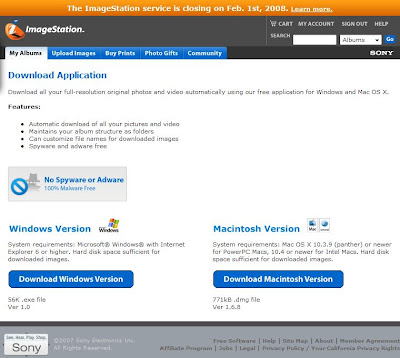

I picked "Windows version" for my computer running Windows Vista. If you use a Mac computer, choose "Macintosh version". Follow the download instructions provided by your web browser.

Software walkthrough
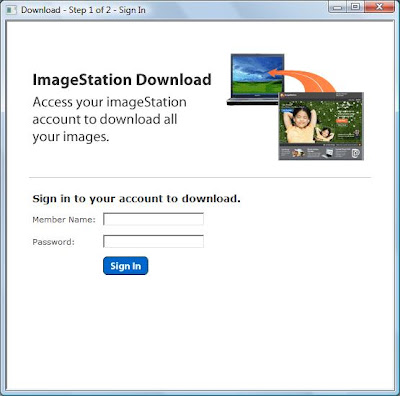
Run the application from where it has been placed. On Windows, you may need to answer to a couple of security warning dialog boxes in order to have the software up and running. Here's the first screen of the software running on Windows Vista. You are prompted to enter your ImageStation user ID and password.

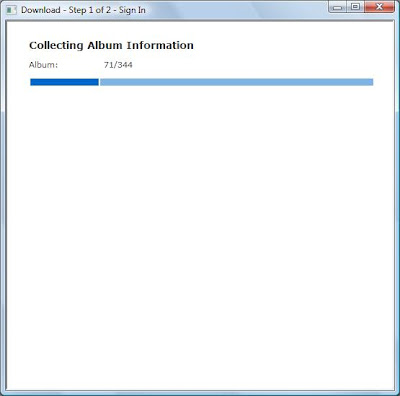
Once you have filled in the information and clicked "Sign in", the software begins to collect information regarding your hosted photos. The screen shows how many albums you have, and how many it has collected information from. The time it takes to complete this step varies by how many photos you have uploaded to the web site. In my case, I had over 300 albums and presumably over 10,000 photos on the web site. It took a few minutes for the step to come to completion.

Once the software is done with collecting photo information, you are told how much disk space is needed to download all your photos. You are also prompted for a location on your local computer to store the photos to be downloaded. You are free to hit "Download" to begin the lengthy download process. Before doing so, you may take a look at the advanced options you are given.
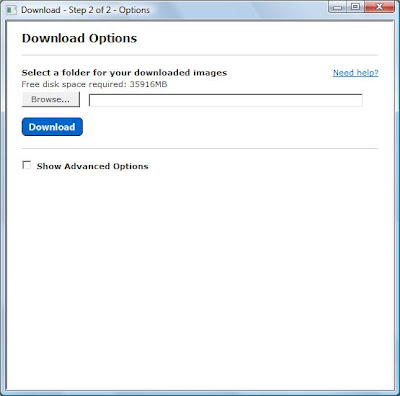

More download options
Clicking at the "Show Advanced Options" checkbox, a host of new options are shown at the bottom of the screen.
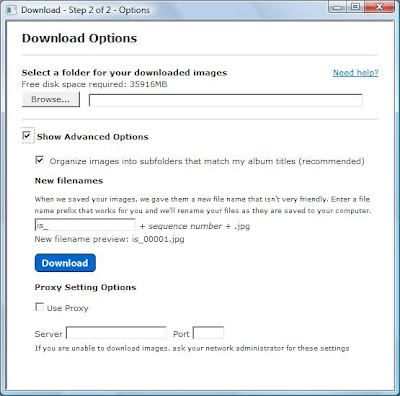

The "Organize images into subfolders that match my album titles" option is preselected. Uncheck the option only if you do not want photos to be saved into subfolders corresponding to their albums. I'd not disable this option.

The next option is a bit tricky. The software asks for a prefix for the names of the files to be saved for the photos. Why, you may ask, would I need to care about that? It's at Sony's fault. They claim that once photos have been uploaded to ImageStation, their original file names are removed on the web site. Therefore, the software cannot come up with the original file names for the hosted photos. The software preselects "is_" to be the file name prefix. Yet you can specify a different prefix. I personally think it is a really bad default value. More importantly, I think it is just dumb the way ImageStation handles the file names. When the photos are uploaded, the titles of the photos are by default their original file names. So in case the title of a hosted photo stays unchanged (that is the case for 99% of my photos), the software can correctly reconstruct the local file names of the photos. I will probably make this request to ImageStation afterwards.
You can also find at the bottom of the screen options to specify proxy server information to establish proper network connection to ImageStation. This again I find dumb as this option should be made available on the first screen of the software, it tries to connect to the ImageStation online service.


Conclusion
Well, this software is far from being perfect. But this is the only option you have if you want to get back the originals of your precious memories. A couple more things before I close, I haven't tried proceeding with "Download" yet. That's why I haven't shown you the download progress screen and whatever comes after. Secondly, the way the software asks for a prefix for the local file names suggests to me that the software may not be downloading hosted videos onto the local computer at all! I cannot tell for sure until I attempt the download myself. If you have already tried, please post your findings as comments here. Otherwise, I may create a test ImageStation account (if the web site still takes new registration) and try it out before playing with my eronmous collection of hosted photos and videos. I wonder if it would take days to download them all. That's given the unstable wireless connection my computer uses survives throughout the download!

Labels: ,

Thursday, October 25

Your computer is unsafe, again

[newscientist.com] Password-cracking chip causes security concerns
24 October 2007
This is major news in the software security community. The hacking team claimed that they could crack a Windows Vista password in 3-5 days with the aid of a not-so-expensive graphics card. And from the screenshot it looked like the password cracking software needs to run in the same local network as the victim. A few things come to my mind:
  1. Blocking physical access to your local network is still the safest measure.
  2. Always deploy a firewall to block unwanted network traffic.
  3. Don't access websites that do not estalish secured log-on.
  4. Avoid using public WIFI networks.
  5. Always keep your computer up-to-date with the latest security patches.
  6. Disconnect Internet connection after use. Unplugging your computer is the only sure way it does not get hacked.
  7. Don't create file shares and don't host unneeded network services (including BT, eMule and other P2P services).
  8. Don't download or install third party applications (including web controls) just because they look cute.
  9. Install anti-virus software. Even free products like AVG or Avast! are very effective. Ask a computer guru friend when your computer begins to act funny.

Labels: ,

Gmail now supports IMAP for free

If you have unlimited data access from your mobile device, you may be interested in this.

Gmail has just announced its suppport for IMAP. This allows you to use your phone's built-in email interface to access messages in your Gmail account without the need to go to the Gmail website. The advantages of IMAP over POP are reliability and its multi-device support.

On google.com:

[qmul.ac.uk] Comparing POP and IMAP

Labels:

Thursday, October 11

ImageStation shutdown - action required


ImageStation has recently made available a software tool to let you download all the pics and videos you have on the website. You still have a bit over 110 days to download them all.

Labels:

Wednesday, September 5

ImageStation is closing


I never thought ImageStation ever made a profit for what it does. I have been so used to it that I didn't picture the day when it decides to quit - until now. Yes, ImageStation is shutting down. The business will end on Feb 1, 2008. Starting Nov 11, you won't be able to upload new pictures. According to the official site, the service will later provide a piece of Windows/Mac software which lets the user to download his/her own images. So if you do not have an offline copy of your own pictures, check the website again in a couple of weeks. Unfortunately the collection of favorite albums that I have slowly built up in the last few years will be lost forever. Hope that's not the case for friendship.

Labels:

Friday, June 29

究竟ActiveSync班人唸D乜?

為一位外行的新朋友找找如何可以把Pocket PC的備份還原至另一部機,便上網搜尋資訊。不少網站也有相關的敎學:
看得我也心思思想用ActiveSync為自己部機做備份。點知~~~
Microsoft ActiveSync 說明
備份與還原資訊概觀

備份與還原資訊概觀注意:只有 Windows Mobile software for Smartphone 2003 與之前版本,以及 Windows Mobile software for Pocket PC 2003 與之前版本,才支援備份與還原資訊。

Labels: ,

Sunday, February 25

Virtual PC 2007 now available

If you don't know what a virtual PC or virtual machine is, you may skip this post. The new version now supports Windows Vista. Take it for a spin today!

Off to the Microsoft site

Labels: ,

Monday, February 12

What's better than the free Finale NotePad?

Having trouble with singing your part in a song? And you don't know how to play a piano? Enter Anvil Studio, a free software that allows you to speedily enter notes and play them back as .MID, and much much more. It may take a bit more time to get use to the keyboard interface but once you get the hang of it, you will not want to go back to doing things with mouse. I am not sure my music-loving friends come to my blog or not. Anyhow, this is to me way better than the free version of Finale NotePad. The old MIDI Studio I got from the Gravis sound card bundle is nothing comparable to it. Definitely there are much rooms to yet improve but for a free product, I am not asking more out of it.

I hope you can enjoy digitizing your songs like I do.

Labels:

Sunday, January 14

中文誦讀 繁簡轉換 萬年曆

又找到好東西了。這次是與中文/中曆有關的工具...

[tdc.putonghuaonline.com] 以普通話或廣東話誦讀整段中文字

[alf-li.pcdiscuss.com] ALiBaBar Ver 5.10 「Internet Explorer 外掛插件,讓您輕鬆的將中文網頁轉成繁體或簡體顯示。」

[blog.waynedeng.com] 繁簡轉換JavaScript代碼

[www.123cha.com] 萬年曆

Labels: ,

Friday, October 20

Language barrier in the digital age

As I got this PDA from HK, so that it lets me read and write in Big-5, I am used to working with English (US) on my home computer. This creates a problem: my home computer can't properly list the folders and files on my PDA that are named in Chinese. And because of that, ActiveSync fails to transmit folders and files with Chinese names in either directions. The current workarounds are 1) to rename a folder/file to English before transferring; and 2) to change the codepage settings of the home computer to properly support Big-5. Either workaround is suboptimal.

How much I'd like ActiveSync to have an additional option to automatically convert folder and file names between Big-5 and Unicode. Who would help me with that?
Microsoft Character Code Conversion Routines For HKSCS-2004

Labels: ,

Sunday, September 24

Converting your docs into PDFs for free

When was the last time you needed to convert a file into PDF but didn't find the appropriate tool?

Try PDF Online--free PDF online conversion powered by BCL easyPDF SDK

Labels:

Scanning, manupilating, and converting typed documents into text

I had my lab results back for about a month. I've decided to scan the pages into the computer for keepsake. So I undusted and set up my old flatbed scanner and digitized them into ones and zeros. Then I figured, why not to convert the contents on the scanned images into text? I installed the only free OCR (optical character recognition) software I could find on Google. It's called SimpleOCR. I thought it was one of those things too good to be true. But indeed, it was absolutely free! No string attached. The built-in scan option was so easy to use and and so much faster than the software bundled with the scanner that I simply threw away the scanned images and started from scratch. SimpleOCR's OCR feature is decent. I am certain there are products with better accuracy out there. But how can you beat something free? And to my pleasant surprise, SimpleOCR provides options to save the converted text into Microsoft Word format. I remember the other day I needed something to convert my scanned documents into a single multi-page TIFF file. I just couldn't find anything free that was remotely usable. It turned out the free SimpleOCR has the capability built-in. And the TIFF file it created for my three-page document was only 67KB in size, which was even smaller than 72KB, the size of the Microsoft Word 6.0 file it produced for the same document. What else can one ask for from a free product?

Labels:

Saturday, September 2

Licensing your valuable works

Creative Commons enables you to license your works in digital forms. Microsoft Office now offers an add-in to enable licensing the documents you own.

See http://creativecommons.org/ for details.

Labels:

Friday, August 4

Windows Live spaces, RAW image tool

I was reading RSS feeds with Google Reader and noticed that all the past entries of the MSN spaces of a few friends showed up again as new entries in the reader. It was because those friends "upgraded" their MSN spaces to Windows Live spaces. Having been spoiled by the ad-blocking AvantBrowser, I couldn't stand seeing the ad banner at the top of the layout of those blogs. Anyhow, one of those new-again entries from a friend mentioned a free tool from Microsoft with which you may view RAW images and have thumbnails created for them. I know a few of you own DSLRs so it may be of interest to you.
Download Microsoft RAW Image Thumbnailer and Viewer for Windows XP

Labels:

Friday, July 14

Free bootable CD software

Ultimate Boot CD
A jack-of-all-trades bootable CD you may use to reset OS password, securely wipe old harddisks, and perform many more maintenance/diagnosis tasks without booting your computer off the harddisk.

BartPE bootable live Windows CD/DVD
Boot into Windows from a CD! Though it's free, be sure to read the Licensing Issues page on its website before use.

Labels:

Friday, June 30

Anti-virus and anti-malware

Are you worried that your computer may be infected by virus or malware? Are you concerned that your computer may be hacked into and important information stolen?

There are many users that do not have any virus/malware protection on their PCs. Yet many more do not keep their PCs up-to-date by installing updates. To help you understand how serious this problem is, consider this. Windows computers that are not running Server Pack 2 and always online are vulnerable to attacks from the Internet. They may get infected with virus or hacked into even before the user visits a website or opens an email. This is because there was a security hole in Windows golden version and service pack 1 that the built-in firewall isn't functional at the early stage of computer start-up. It is not uncommon that such computer gets infected with virus or hacked into for just being online for 5 seconds. Yes, this is how serious the problem is. I'd never recommend anyone to start using a Windows computer without installing all the important updates first. I have included some links to information you should know and free software you may install to boost the safety level of your PC.

Here's how to tell whick service pack your Windows XP is running:
  1. Click the "Start" button on the task bar.

  2. Right-click on "My Computer".

  3. Click on "Properties".

  4. On the "System Properties" screen, click on the "General" tab.

  5. Look for the words "Service Pack 2". If your Windows XP computer doesn't have service pack 2, you must get it at once. If you are running Windows 2000, the latest service pack is SP4.


PC Safety 101 for beginners: Consolidated Malware Solution Thread rev .091

Anti-virus software comparation sheet: AV-Comparatives

My recommendation for anti-virus (FREE for home personal use): avast! 4 Home Edition

My recommendation for anti-malware (FREE for individual use): SpywareBlaster 3.5.1

If you are not the type who regularly seek for new updates for your Windows and you are not paying the network bandwidth by usage, you should set up automatic updating to download and notify you of new applicable updates to your PC. If you have other Microsoft products than Windows installed on your computer, you should opt in to the Microsoft Update service. Once opted in, the automatic updating feature on your Windows will get it up-to-date with the latest updates for Windows and your other Microsoft products. Note: automatic updating works for Microsoft Office 2003 only if Office was installed FOR ALL USERS. Also Office XP users may need to go to www.officeupdate.com manually for updates.

So here are the steps to take to enable automatic updating for your Microsoft products on Windows XP:
  1. Go to Microsoft Update and sign up to the service.

  2. Change your automatic updating settings to download automatically applicable updates and to prompt you to install when they are ready.

    1. Click on the "Start" button on the task bar.

    2. Right-click on "My Computer".

    3. Click on "Properties".

    4. On the "System Properties" screen, click on the "Automatic Updates" tab.

    5. Select the "Download updates for me, but let me choose when to install them." option.

    6. Click "OK"

Another effective approach is to have a firewall set up on a router. That way most incoming network packets are pre-filtered by the router before hitting your computer. You may use such firewall to safely allow yourself to fetch the needed update that plugs the security hole I mentioned at the beginning of this article.

Labels:

Friday, June 23

《Out到喊》同埸加映《廣告不見了?》


那個彈出來的小畫面顯示的不是廣告,而是字眼的相關資訊。很方便。反而我就Out到喊。

夢寐以求的廣告殺手--Avant Browser。以修改hosts檔案來防廣告的日子,後會無期。

Labels: ,

Wednesday, May 17

Opera 8.5 beta 2 for Windows Mobile, Pocket PC

因為內置的Pocket IE不能處理有JavaScript的網頁,我無法用我的新拍擋Dopod 818pro登入許多網站。直至到發現Opera 8.5 beta 2 for Windows Mobile, Pocket PC。它能夠處理JavaScript,更能夠同時瀏覽多個網址,非常方便。雖然如此,這也不代表Pocket IE完全被打入冷宮,因為Opera未能支援如Big-5、GB2312等character encoding(出UTF-8中文就完全沒有問題)。注意:現在的beta版本將會於六月一日過期。到時看看有沒有更新的版本。

關於Opera 8.5 beta 2 for Windows Mobile, Pocket PC

Labels:

Friday, April 14

Have you ever thought about...

Connecting to multiple IEEE 802.11 networks with one WiFi card? It's not just a dream!

BTW, you must be a computer geek if you care to read this one...

Labels: ,